How to Play MindBlox
Everything you need to know to start playing, scoring, and mastering the grid.
Everything you need to know to start playing, scoring, and mastering the grid.
MindBlox is easy to learn and takes just a few seconds to understand.
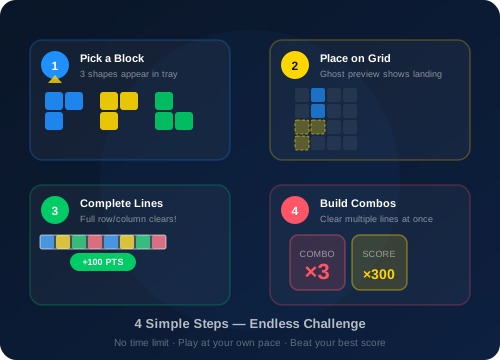
Click or tap anywhere on the game canvas to begin. You will see an 8×8 grid at the top and three random block shapes in the tray at the bottom.
Click and drag (or touch and drag on mobile) any of the three block shapes from the tray. As you drag it over the grid, a transparent ghost preview shows exactly where the block will be placed.
Release the block over a valid position on the grid. If the placement is not valid (cells are already occupied or the block goes out of bounds), the block snaps back to the tray.
When an entire row or column is filled with blocks, it clears automatically and you earn 100 points per line cleared. Clearing multiple lines at once triggers a combo multiplier for bonus points.
Once all three blocks from the tray have been placed, three new random blocks appear. You must use all three before the tray refills.
The game ends when none of the three available blocks can be placed anywhere on the grid. Your final score is displayed, and your personal best is saved automatically in your browser.
Each complete row or column you clear earns 100 points.
Clear 2 or more lines at once and your score is multiplied by your combo count.
Your personal best is saved in your browser and displayed at the top of the game.
Look at all three blocks in the tray before placing any of them. Plan which block goes where to set up future line clears.
Avoid filling the center of the grid too quickly. Keeping space in the middle gives you more options for placing awkward shapes.
Try to set up situations where placing one block completes multiple rows and columns simultaneously. This triggers the combo multiplier for massive points.
Small 1×1 or 1×2 blocks are great for filling gaps. Save them for tight spots that larger blocks cannot reach.
Now that you know the rules, put your skills to the test!
Play MindBlox Now